A few weeks ago I wrote about setting up a todo.txt web service on a VPS. It ran fine but it always bothered me that a task list -- one of the most personal and low-stakes things I run -- was sitting on a rented server I don't control. I have a homelab. The whole point of a homelab is to run things on it. So I moved it.
While I was at it, I built a proper terminal UI for it in Rust. That turned out to be more interesting than the migration.
The service is a Flask app packaged as a Docker image. On the VPS it ran behind nginx with a Let's Encrypt certificate. On the homelab I already have Traefik routing HTTPS traffic through a Cloudflare tunnel, so adding a new service is just a matter of dropping it into the compose file with the right labels.
todo:
  image: ghcr.io/waffle2k/todotxt-web:latest
  container_name: todo
  restart: unless-stopped
  environment:
    - FLASK_ENV=production
    - TODO_FILES_DIR=/app/data
    - SECRET_KEY=${TODO_SECRET_KEY}
  healthcheck:
    test: ["CMD", "python3", "-c",
           "import urllib.request; urllib.request.urlopen('http://localhost:5000/login')"]
    interval: 30s
    timeout: 10s
    retries: 3
    start_period: 5s
  volumes:
    - ./todo/data:/app/data
  labels:
    - traefik.enable=true
    - traefik.http.routers.todo.rule=Host(`todo.$HOMELAB`)
    - traefik.http.routers.todo.tls=true
    - traefik.http.services.todo.loadbalancer.server.port=5000
  networks:
    - cloudflaretunnel
Data migration was a one-liner -- the app stores everything in a flat directory, so I just copied two files over SSH.
After deploying I couldn't reach the new URL. Traefik's API showed the container wasn't registered as a router at all, even though it was running and responding. The labels were correct. Restarting Traefik didn't help. A test container with identical labels registered immediately.
The culprit: the Docker image ships with a built-in HEALTHCHECK that runs curl -f http://localhost:5000/login, but curl isn't installed in the image. So every health check attempt fails, the container stays in "starting" status indefinitely, and Traefik v3 -- which withholds routing until a container is healthy -- never exposes it.
The fix is to override the health check in the compose file. Since the image has Python, that's easy:
healthcheck:
  test: ["CMD", "python3", "-c",
         "import urllib.request; urllib.request.urlopen('http://localhost:5000/login')"]
After that, the container went healthy, the router appeared, and todo.$HOMELAB was live. The old VPS config now does a 301 redirect to the new URL.
This is a subtle failure mode worth remembering. Traefik's docker provider doesn't log anything when it skips an unhealthy container -- the router just doesn't appear. If you're debugging missing routers, check docker inspect container --format '{{.State.Health.Status}}' before anything else.
I already had a CLI client and a Neovim plugin for the todo API. What I didn't have was something I could open in a dedicated terminal pane and actually interact with. So I wrote one in Rust using ratatui.
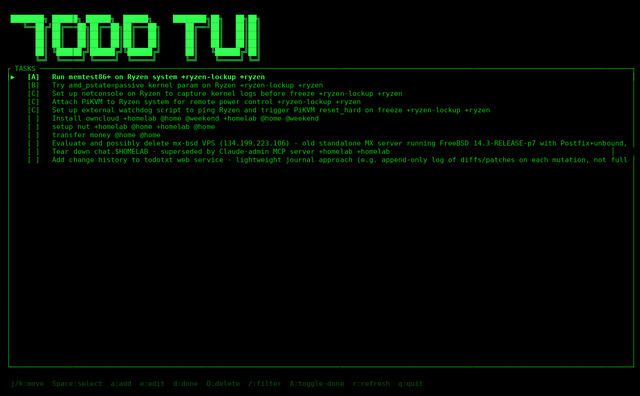
The result is a retro terminal UI -- green on black, ASCII art header, box-drawing borders. It talks directly to the same HTTP API the CLI uses. No local file, no sync -- just the service.
The header is a splash screen. The first keypress dismisses it and the task list expands to fill the terminal.
Navigation is vim-style. j/k to move, a to add a task, e to edit the current one, d to toggle done, D to delete with confirmation. r to refresh from the server.
The filter is regex. Press /, type a pattern, press Enter:
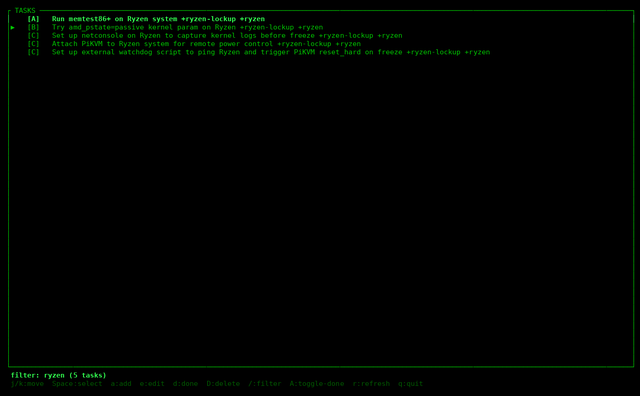
So /ryzen|email matches tasks from either project. /\+homelab matches the literal tag. The filter applies to the raw todo.txt line, so everything -- description, projects, contexts, priority -- is searchable with one pattern.
The other thing I wanted was the ability to use the UI as a picker -- like fzf, but for my task list. Press Space to mark tasks, then q to quit and have the selected tasks printed to stdout.
$ todotui | xargs -I{} notify-send "Task" "{}"
* selects all visible tasks (useful after filtering). \ deselects everything. X bulk-deletes the selection without a confirmation prompt.
The picker angle turns out to be useful for things like: filter to a project, select the tasks I'm working on today, pipe to a script. It's the kind of thing that's awkward with a web UI and natural in a terminal.
The source is at ~/todotui/ -- about 400 lines across four files. api.rs is a thin blocking reqwest wrapper around the HTTP API. app.rs holds state and the filter/select logic. ui.rs does the ratatui rendering. main.rs is the event loop.
Dependencies: ratatui, crossterm, reqwest (blocking, with cookie jar for session auth), serde, regex, anyhow. No async -- a todo list app doesn't need it, and blocking makes the code much simpler.
The connection URL and credentials come from environment variables (TODO_URL, TODO_USER, TODO_PASS) with hardcoded defaults for my own setup. To build and install:
cd ~/todotui
cargo build --release
cp target/release/todotui ~/bin/todotui
The todo.txt ecosystem now looks like this:
todo.$HOMELAB  (Flask, Docker on homelab)
    |
    +-- ~/bin/todo          CLI (Python, todo.sh-compatible)
    +-- todotui             Rust TUI (this post)
    +-- todo.lua            Neovim floating window
The terminal UI is what I reach for when I want to look at the full list and think. Everything talks to the same HTTP API, so any client sees the same state.